Finding a dependable method for making endless international calls without incurring a telecommunications fee is a bit like a search for the Holy Grail. According to the ToTok APK promotional text, it is a free service which offers its users the ability to have free voice and video calls using the internet. This service is especially popular in the Middle Eastern and Asian countries.
ToTok is a free programme for Android that can be found in the Telephony list of apps and was developed by Totok Pte. Ltd. It is available for download on various platforms including Aptoide and Softonic. To date it has been downloaded over 63,000 times and the app, as well as its documentation, are available in multiple languages including English.
It doesn't matter if you want to catch up with friends living abroad or coordinate with large groups knowing how this app works, and how to safely install it, is pretty crucial.
Key Takeaways
- ToTok APK is the Android installer file for a messaging app that lets you make unlimited HD video calls, voice calls & text chats over Wi-Fi or mobile data connections.
- Users can create massive Supergroups with up to 10,000 members and host group video calls with around 20 participants, making it a great tool for both personal and community use
- The app has had its removal from Google Play & the App Store in some regions due to privacy concerns, so in these areas APK sideloading from trusted sources can be a bit of a necessity.
- You'll need a stable internet connection, the latest version of ToTok APK and your phone number to be verified in order to register and start using the app
- This article also looks at development costs, alternatives such as WhatsApp and Telegram & how DXB APPS can create similar calling & messaging solutions for businesses
What Is ToTok APK?
ToTok is a free messaging app designed for Android. Its main goal is to deliver high-quality video calls, voice calls, and chat functionality all run through your internet connection rather than traditional mobile minutes. ToTok's APK is their app's download file that has to be manually installed from their website or third-party app stores as it is officially no longer available on most app stores.
Specifically, a "ToTok APK" is the package file that is used for sideloading the app as it is not available on the Google Play Store. This method of installation has been used by a lot of people who live in areas where this application has been banned or deprioritized from the official app stores.
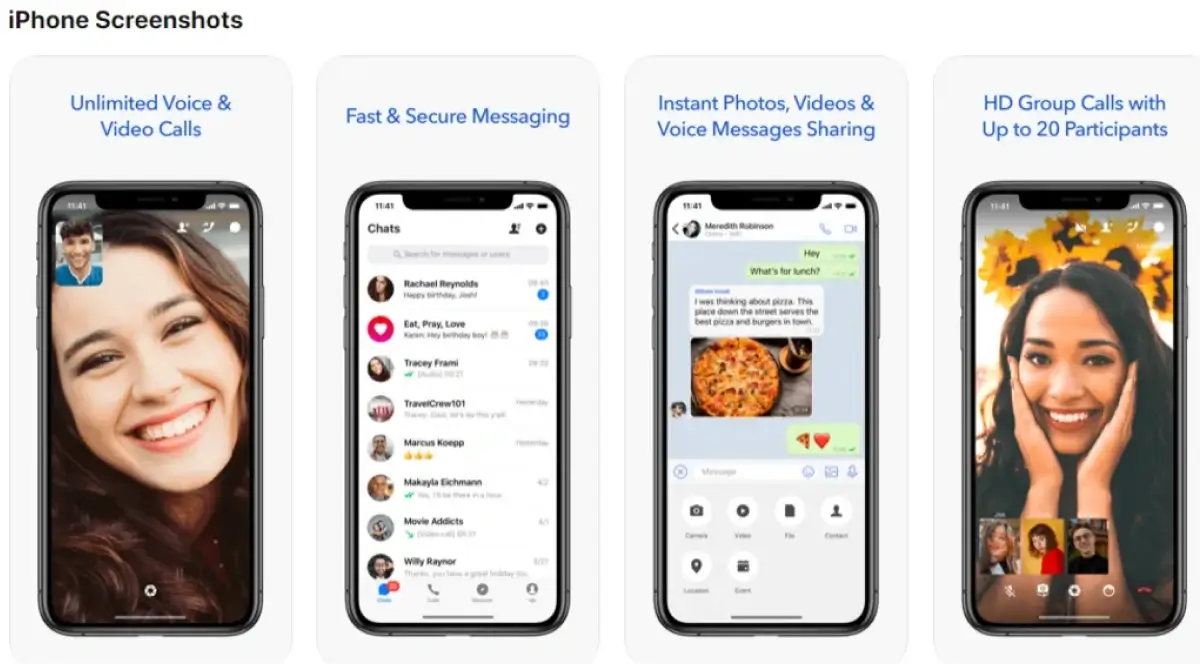
ToTok enables HD quality voice and video calling, 1-on-1 messaging, and group chats. ToTok’s app is even more advanced with AI technology to auto improve acoustics and remove echo from calls. ToTok helps save even more by providing free unlimited calling for everyone.
ToTok began its journey in 2019, but with some unique restrictions for usage, it made a small killing in the Gulf Region with its broad use in the UAE, Oman, Libya, Yemen and Saudi Arabia. The app has been improving and updating on 3rd party download portals in 2023-2025 with its latest update, 1.9.1, being in September of 2023.
ToTok is available on Google Play Store with a high and stable rating of 4.5 out of 5 stars.
ToTok is mainly a free international calling app to help Expats with calling families, Friends with planning gatherings, and communities who want to replace WhatsApp, Skype or Telegram for their day to day interactions.
Main Features of ToTok – Free HD Video Calls & Voice Chats
Free HD Video Calls
ToTok delivers free hd video call experiences that are optimized for both Wi-Fi & 4G/5G data networks. Video quality will automatically adjust to what your connection speed can handle, scaling down pretty gracefully on slower networks so you don't get dropped calls.
Free HD Voice Calls
Voice calls for users with limited data plans consume less data and provide clearer audio. ToTok employs AI for echo cancellation and noise reduction, ensuring clear conversations in any environment.
Unlimited Calls & Chats
There are no in-app calling minute limits or message caps. Your only constraint is your data plan or Wi-Fi availability - making ToTok super valuable for lengthy international calls where traditional roaming charges are just too expensive.
Group Messaging & Supergroups
ToTok's functionality extends to Supergroups of 10,000 members. This is perfect for connecting networks for virtual meetings, community announcements, and app integrations for organizational needs.
Group Video Calls
ToTok has long prided itself on being able to host video calls for a virtual meeting-style larger than 20 people at the same time. This is excellent for team meetings, family get-togethers, and simply keeping in touch with friends around the world.
Multimedia Messaging Tools
You can send and receive all sorts of multimedia messages on the app, including:
- Text messages (you can send as many as you want)
- Photos and videos
- Voice messages
- GIFs and stickers
- Emojis (of course!)
- Location sharing (so you can easily show people where you are)
- Name cards for contact sharing (makes it easy to share contact info with others)
And - nice feature - you can even take screenshots within the app to capture important moments or show others a problem you're having with support.
Visual and Cosmetic Features
ToTok has a pretty cool built-in retouch filter that you can apply to video calls in real-time. Just tap one button to enable skin smoothing and you've got a polished look - pretty handy for video-heavy communication cultures, that's for sure.
Local Time Display
ToTok displays the other party's time during chats, allowing users to see the recipient's local time and avoid calling them at a bad hour - especially important if they're in a different country.
Address Book Integration
ToTok will link with your contacts, so you can quickly see who you can send an invite to via SMS or a shareable link.
Security, Privacy, and Permissions in ToTok APK
Before you install the APK, it's really important to know what permissions ToTok is asking for and how it handles your data. Always scan the APK for malware before you install it - you don't want any nasty surprises.
If you do run into any problems or have some suggestions on how to improve the call quality, use the app's support features to give feedback - the more info the developers have, the better they can make the app for everyone.
Announced Encryption Standards
According to the developer docs, ToTok is using modern encryption methods like 256-bit AES to protect your data and 2048-bit RSA for secure key exchange. It transmits communications over secure channels using TLS protocols - sounds good, right? Though of course you should probably double check the current encryption implementation for yourself.
Required Android Permissions
| Permission | Purpose |
|---|---|
| Contacts | Sync phone contacts to identify ToTok users |
| Microphone | Enable voice calls and voice messages |
| Camera | Enable video calls and photo sharing |
| Storage/Media | Save and send photos, videos, files |
| Network Status | Monitor connection quality for call optimization |
| Notifications | Alert users to incoming calls and messages |
Contact Sync Considerations
When you provide your contacts, ToTok saves them in encrypted form on their servers in order to identify users. They recommend if you’re concerned about privacy, to read the privacy policy and think about the implications you’re sharing your address book to.
Past Controversies
ToTok has faced numerous controversies. Having your contacts being spied on by ToTok is one concerning controversy, for which evidence has been found. You will have to do your own research to see if you will not be spied on and if you are comfortable with using the application.
Always, always, always download ToTok app from a reputable source and scan it with updated antivirus before you install it.
If you are going to use it for business or enterprise use, getting your security and IT teams involved would be a sensible idea before you install it on the company's devices.
Security Risks and Privacy Controversies
Due to identified security problems, ToTok was banned from all legitimate app stores, so, to obtain ToTok, you’ll have to sideload the app. That means you could potentially download a fake and possibly harmful version of ToTok. So, it’s probably best to only download ToTok from trustworthy sources and avoid any app stores.
There is already evidence of ToTok being spyware that already collects your contacts and location along with other personally identifiable information. ToTok collects a lot of personally identifiable information from the user and the device as ToTok requests access to the camera and microphone.
The option for totok app download free for iphone has been removed from the certified app stores a couple of times as a result of multiple state-sponsored publishing app store entries that are suspected by multiple governments to be a surveillance means so there are multiple media reports that show that the United States government is of the opinion that the ToTok app is a surveillance app used by the government of the United Arab Emirates and that is a large part of the reason it was removed from its publishing platforms and questioned whether it is a surveillance app or whether it is a secure app.
ToTok should be treated with caution until the developers reassure everyone that security has been resolved. Always be careful about ToTok's permissions.

How to Download and Install ToTok APK
Totok app download and installation safely means following a few proper steps, especially if it's not available in the official stores where you live.
Step 1: Check Official Stores First
Before you go looking for an APK, check to see if ToTok is in Google Play or a trusted app marketplace in your region - this will be the safest way to install it if it's available.
Step 2: Choose a Reputable APK Source
If ToTok isn't available officially, look for an APK source that shows a version history, file size and update dates. You should be looking for sites that have updated ToTok up to 2023 - 2025 and avoiding any random unknown mirrors.
Step 3: Enable Unknown Sources
Head over to your Android Settings, Security, then locate the "Install unknown apps" or "Allow from this source" setting for your browser or file manager. Don't forget to turn it off once you've installed the app for better security.
Step 4: Download the Latest Version
Get the very latest stable ToTok APK version (something like 1.9.x or the next one up) that matches your device's Android OS and architecture type - 32 or 64 bit. Some devices need a specific variant.
Step 5: Install and Launch
Open the downloaded APK file, have a look at the permissions it's asking for, tap Install, and wait for it to finish, then tap the ToTok icon to open it up.
Initial Setup Process
| Setup Step | Action Required |
|---|---|
| Phone Verification | Enter your number and confirm via SMS code |
| Permissions | Grant microphone, camera, and contacts access |
| Profile | Set your display name and profile photo |
| Notifications | Enable alerts for incoming calls and messages |
| Backup | Optionally enable chat backup features |
Maintaining Updates
For ToTok updates that you have accepted, check your preferred download site for the newest ToTok APK. Most updates are quick, with substantially improved call quality and increased app security. ToTok updates also try to swiftly patch any bugs and errors.
ToTok APK Version History and Performance Improvements
ToTok app for iPhone has made some serious strides since its launch in 2019, constantly improving call quality, reliability, and its compatibility with the latest Android releases.
Looking to the future, ToTok is expected to see continued growth in downloads and views as its popularity increases.
Early Releases (2019)
The first public releases, from August to December 2019, were all about getting the basics right: good HD calling and text messaging. By August 2019, they'd fixed the call quality issues and crashes in 1.0.35. Then they added Arabic language support and some nice media organisation features in October with version 1.1.157.
Mid-Development Updates
The 1.2.x series introduced significant improvements:
- Sound output switching (speaker, earpiece, Bluetooth)
- Voice-verified SMS codes for registration
- Chat search functionality
- Easier contact imports from other apps
- Chat wallpaper customization options
- Quick camera toggle controls
Later Versions (2020–2025)
Totok free video call app is further improving with version update 1.8.7, and the versions that follow, by optimizing the saving of bandwidth and providing video refinement, and even using AI to detect background noise and echoes and suppress them. These updates also improved Android version 11, 12, 13, and beyond, as well as additional support for custom skins, such as the Samsung, Xiaomi and Huawei.
| Version | Timeframe | Key Changes |
|---|---|---|
| 1.0.35 | August 2019 | Initial release, call quality fixes |
| 1.1.157 | October 2019 | Arabic support, media sorting |
| 1.2.x | November-December 2019 | Bluetooth switching, chat wallpaper, search |
| 1.8.x | 2020 | Performance optimization, bug fixes |
| 1.9.x+ | 2023-2025 | Bandwidth optimization, newer Android support |
Users should prefer the latest stable release unless specific device limitations require an older build.
ToTok App Alternatives
This section allows the reader to analyze the offerings of ToTok in comparison to the competitors in the market and understand what it would take to create a similar service.
WhatsApp is the most popular messaging and calling app to have, globally. It has the ability to end-to-end encryption, group calls, and integrates seamlessly with your phone contacts. On the other hand, it does have some more limitations when it comes to larger groups and is also owned by Meta which definitely raises some concerns to some users about data sharing.
Botim
Botim is a UAE-approved VoIP and messaging app that has HD calling and messaging. It is a great alternative to TokTok and allows users to have smooth and stable communication for business and personal use.
Telegram
This is a messaging app that uses cloud technology that allows unlimited group messaging, large channel broadcast and messaging, and has the ability to create secret chats which will self-destruct.
Signal
With Signal, users experience strong encryption and a commitment to privacy. Signal is a smaller community than WhatsApp but gives great services.
Skype, Viber, and Google Meet
These platforms are more geared towards traditional or business use cases. Google Meet and Skype are really good for work calls and screen sharing, while Viber is popular in certain regions.
| Platform | Group Call Limit | Encryption | Best For |
|---|---|---|---|
| 8 participants | End-to-end | Daily personal messaging | |
| Telegram | Growing support | Optional E2E | Large communities, channels |
| Signal | Limited | End-to-end | Privacy-focused users |
| Google Meet | 100+ participants | In-transit | Business meetings |
Pick the best alternative for your priorities - do you want the best call quality, biggest group sizes, or business-grade features like screen sharing?
How Much Does it Cost to Build an App Like ToTok?
Developing a free video call alternative like ToTok requires some serious investment in real-time communication infrastructure. These numbers are rough estimates and will vary depending on your region, team structure and the exact features you want.
1. Basic MVP – $25,000 to $50,000
A simple version designed to validate your idea and enter the market quickly.
Includes advanced features such as:
- User registration & profile management
- One-to-one messaging
- Basic voice and video calls
- Simple UI/UX interface
2. Mid-Level App – $50,000 to $90,000
A more competitive version suitable for growing user bases.
Includes advanced features such as:
- Group voice & video calls
- Media and file sharing
- Push notifications
- Cross-platform development (iOS & Android)
- Enhanced security features
3. Advanced App – $100,000+
A scalable and enterprise-ready communication platform.
Includes advanced features such as:
- End-to-end encryption
- Cloud-based scalable infrastructure
- Admin dashboard & analytics
- AI-powered moderation
- High-definition video streaming
Partnering with specialized mobile app developers experienced in VoIP and WebRTC reduces technical risk and optimizes performance outcomes.

DXB APPS – Mobile App Development for Calling and Messaging Solutions in Dubai
So you want to build your own comms platform rather than rely on third-party apps like ToTok? Well, working with experienced devs is the only way to go.
DXB APPS is an award-winning mobile app development company in Dubai, UAE and they've got the skills to build high-performance Android and iOS apps for startups, SMEs and enterprise clients all over the region.
Comprehensive Development Services
At DXB APPS, we deliver end-to-end mobile app development Dubai services that cover everything from strategy to UI/UX design, backend architecture, and deployment. Our mobile app development Dubai team has got tonnes of experience with VoIP technologies, WebRTC integration, real-time chat systems, push notifications and scalable backend infrastructures - all the good stuff.
Our Technical Expertise
We're not just any old app development company - we're both an android app development company in Dubai and an ios app development company in Dubai. We build apps that perform super-smooth on any device brand - from Samsung to Apple.
Our mobile app devs know the ins and outs of building comms apps - from echo-cancellation algorithms to global server deployment.
Regional Understanding
We're one of the top mobile app development companies in Dubai and we've got a real deep understanding of telecom regulations, data privacy requirements and local market needs all over the UAE and GCC region. That's a real asset when building comms tools that need to comply with local standards while working with international users.
What DXB APPS Can Build?
Clients can approach DXB APPS for:
- Feasibility studies and architecture planning
- Cost estimation and roadmap development
- Full-cycle product delivery from concept to launch
- Building proprietary corporate comms platforms that'll keep your business secure
- Alternative apps to what you're currently using with enhanced privacy features
- Custom VoIP solutions that'll blow your competitors away
Interested in creating your own HD calling and messaging app? Contact DXB APPS for a free consultation, detailed proposal, and roadmap on planning, designing, and launching your communication platform.
Looking for more options? Also read: Top Video Calling Apps in UAE
Conclusion
Download totok app as it's a pretty cool app and has loads of features, is free and offers HD video calls and voice chats, large groups and messaging all over the internet. For those who want to send messages and make calls to friends and family all over the world without paying for it, this app offers genuine value - and its free for all.The main appeal remains crystal clear : unlimited international calls with solid call quality, and extras like group video and a retouch filter that make it so much easier to stay in touch with friends and family who live abroad - and that's especially important for expats and families with loved ones scattered all over the world.
That said, it's worth taking a bit of extra care when installing this app . Be sure to grab your downloads from trustworthy sources and be on the lookout for the usual stuff - like weird permissions requests and dodgy updates. And while we're on the topic - keeping your antivirus up to date is always a good idea.
Now, we know there are some other well known messaging apps out there too - and each has its own strengths. WhatsApp may be everywhere , but Telegram has its own spin for communities , while Signal is definitely the go to if you're after a bit of extra security . If you're a business or startup then you might even want to consider going for a custom solution that brings in the best bits of ToTok without all the controversy.
For businesses or startups, developing a custom communication platform can be a smarter long-term strategy. Instead of relying solely on third-party calling apps in UAE, companies can build tailored solutions with stronger privacy controls and scalable infrastructure. A technology partner like DXB APPS can help estimate costs, design secure VoIP architecture, and launch a fully compliant calling and messaging application tailored to the Middle East market.
Frequently Asked Questions
Is it safe to install ToTok APK on my Android phone?
Installing ToTok APK is safe only if downloaded from a trusted and verified source. Users should scan the file with antivirus software, verify publisher details, check app permissions carefully, and keep their Android device updated to reduce security risks.
Why can’t I find ToTok in the Google Play Store in my country?
Installing ToTok APK is safe only if downloaded from a trusted and verified source. Users should scan the file with antivirus software, verify publisher details, check app permissions carefully, and keep their Android device updated to reduce security risks.
How much data does a ToTok HD video call use?
ToTok may not be available in some countries due to regional restrictions, store policy decisions, or previous privacy concerns. App availability varies by location, and users should check their local Play Store for official updates.
Can I use ToTok APK on tablets and older Android devices?
ToTok APK generally works on most Android smartphones and tablets meeting the minimum OS requirement (typically Android 5.0 or higher). Very old devices may experience performance issues with newer APK versions. Check the minimum Android requirement listed on the download page and consider a lighter build only if your hardware struggles with current releases. Tablets without SIM cards can still use ToTok by verifying a mobile number through another phone during registration, then connecting via Wi-Fi.
What should I do if the ToTok APK fails to install or keeps crashing?
If installation fails, clear cache, restart the device, check storage space, re-download the correct APK version (32-bit or 64-bit), and update Android OS. If issues continue, try installing a different compatible version.