Key Takeaways:
- Moneycontrol is the best site to provide real time updates of stocks, portfolio management and expert opinion since they are user friendly.
- The application aids in screening stock, watches, and interactive charts to enable the user to make the best decisions.
- It is free and premium, the latter includes more sophisticated functions, such as live information and detailed analysis.
- Secure data protection is also offered at Moneycontrol with such functions as Two-Factor Authentication (2FA).
- The application is ideal to learn and monitor investments, and more complex traders might require more functions.
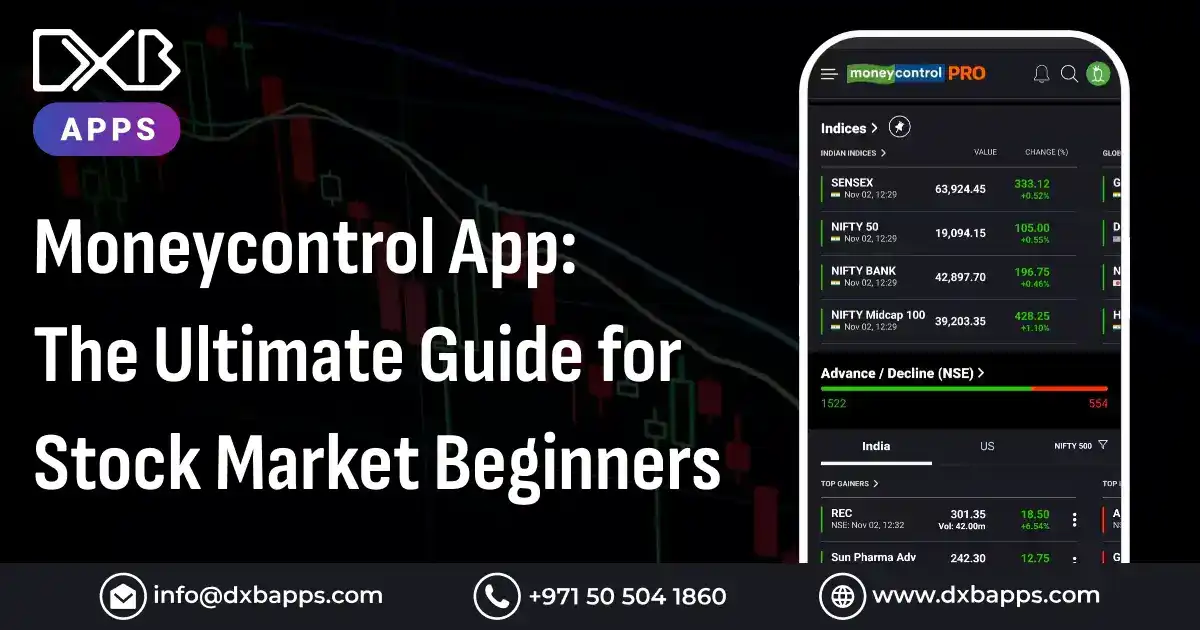
As the stock market becomes easier to access, a reliable app is key for beginners. The Moneycontrol app is popular in 2026 for its simple design and strong tools. It helps users make smart choices in the fast-moving stock market. It offers real-time data, custom alerts, and expert analysis. This makes it a valuable resource for new investors.
In 2026, trading apps are must-have tools for many investors. This is true in places like the UAE, where retail investing keeps growing. Recent stats show more people in the UAE use digital platforms like Moneycontrol. They use it to follow trends, track portfolios, and learn from experts.
This guide explains the Moneycontrol App Pro key features and benefits for beginners. It also shares tips to help you invest with more confidence. If you are new or want to learn more, this guide can help. It is made to help you get the most from the Moneycontrol app.

What is the Moneycontrol App?
The Moneycontrol app is a top financial platform for tracking and managing investments. It is built for beginners and experienced investors. It provides real-time updates on stock prices, market trends, and portfolio results.
The app includes live data, stock screening, company details, and expert ideas. It supports many asset types, including stocks, mutual funds, and commodities. This lets users see their finances in one place.
Features of Moneycontrol App for Beginners
The Moneycontrol app is built for beginners and keeps investing simpler. Here are the main moneycontrol app features that help new users get started.
1. Real-Time Stock Market Data
A key feature is real-time stock market data for tracking trends. For beginners, price and index updates help support timely decisions. Live quotes help users respond fast to market changes. This helps with tracking holdings or finding new ideas. It helps users feel more confident in a changing market.
- Instant access to market data
- Ability to react quickly to price changes
- Helps beginners make informed decisions on time-sensitive opportunities
2. News and Analysis
The app gives beginners access to current financial news. This helps them follow global and local market changes. It pulls news from several trusted sources. It also includes expert views and detailed market analysis. This helps beginners learn how events can affect investments.
- Latest financial news from reliable sources
- Expert opinions and market insights for informed decision-making
- Helps beginners see how global events affect the stock market
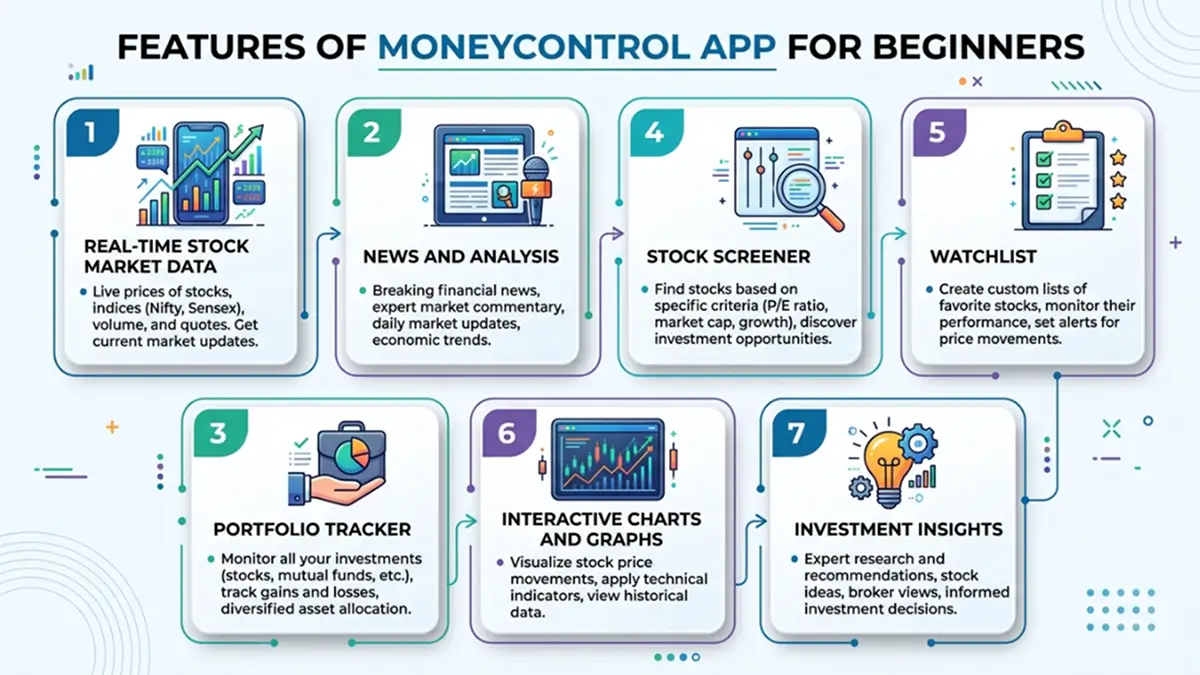
3. Portfolio Tracker
The app makes it easy to set up and manage a portfolio. Beginners can track their investments in real time. Users can add stocks, mutual funds, and other assets. They can view gains, losses, and overall portfolio health. Users can also make more than one portfolio. This helps track different goals or strategies.
- Real-time portfolio tracking
- Easy access to gains, losses, and asset performance
- Multiple portfolio management for diverse investments
4. Stock Screener
The stock screener helps beginners filter stocks by chosen criteria. Filters include market cap, industry, and P/E ratio. This helps users find stocks that match their needs. Custom filters help users narrow results as they learn. This supports a more active way to pick investments.
- Filter stocks based on market cap, P/E ratio, and other factors
- Start with broad searches and refine them over time
- Identify stocks that fit your goals and risk level
5. Watchlist
The app lets beginners create watchlists for stocks they want to follow. Users can track price moves, news, and company updates. This is helpful if you want to watch before buying. It also supports tracking many stocks at once. This makes it easier to compare possible investments.
- Track stocks of interest without buying right away
- Monitor price changes and set alerts for specific stocks
- Compare a range of stocks to guide future choices
6. Interactive Charts and Graphs
Interactive charts show stock data in a clear visual format. This helps beginners who are new to technical analysis. Charts show trends, volatility, and past performance. They help users spot patterns and learn stock behavior.
- Visual view of stock performance over time
- Helps beginners spot trends and make better predictions
- Useful for learning basic technical analysis
7. Investment Insights
The app offers alerts and guidance for beginners who want support. Users can get updates on key events and price changes. They can also see expert recommendations. Alerts can be adjusted based on user preferences. This helps users focus on the most relevant updates.
- Personalized investment advice and alerts
- Notifications on market events and stock price changes
- Customizable alerts to match your investing preferences
With these features, Moneycontrol is a strong app for beginners. It provides tools, data, and insights to invest with more confidence.

How to Get Started with the Moneycontrol App?
If you want to know how to use the Moneycontrol app, simply download the app, create an account, add stocks to your portfolio, set up watchlists, and start tracking real-time market data to make informed investment decisions.
1. Download and Installation
To get started with money control app download:
- iOS: Download from the App Store.
- Android: Install from the Google Play Store.
- Web Version: Access via the Moneycontrol website.
Once installed, open the app and start setting up your account.The Moneycontrol app for PC allows users to track stocks, manage portfolios, and access real-time market data, providing a seamless investment experience on desktop devices.
2. Account Setup
Create your account by:
- Signing up with your email, mobile number, or using Google/Facebook.
- Add portfolio information to get personalized insights and updates.
3. Navigating the App Interface
The app's main tabs are simple to use:
- Home Screen: Overview of market data.
- Markets Tab: Detailed info on indices and sectors.
- Portfolio Tab: Track your investments.
- Watchlist Tab: Monitor stocks without investing.
- News and Analysis: Latest market updates.
4. Customizing Your Experience
Personalize your app experience by:
- Personalisation - specifying what stocks or industries you want to track.
- Action goals Automatic alert on a price decline or change on stocks.
- Engaging in education materials such as articles and tutorials to enhance your market education.
All these simple steps will get you prepared to use the Moneycontrol app and begin making informed investment choices.
How to Use the Moneycontrol App for Stock Market Research?
1. Analyzing Stock Performance
Moneycontrol stock tracking gives essential data to assess the performance of a stock, including:
- P/E Ratio: This is used to show how it affects the valuation of a stock as either over or under valuation.
- Market Cap: Markets Cap assists in determining the size of a company, which is useful in analyzing the risks of a company.
- Dividends: This is where the dividend yield is displayed and is significant to income oriented investors.
2. Using Technical Analysis Tools
Moneycontrol has provided its users with technical analysis tools such as:
- Technical Charts: Visual chart of the price movement through the time.
- Candlestick Patterns: Assists in tracking the market trends in relation to price.
- Moving Averages: Detects changes by using stock price data to smooth the data out to identify trends and reversals.
These tools enable novices to be aware of the patterns e.g. allotting bullish or bearish trends which aid in short-term trading decisions.
3. Fundamental Analysis with Moneycontrol
- By analyzing: Moneycontrol gives you a full picture of the financial well-being of a business.
- Company Reports: You can get company reports on revenue, profit margin and growth, quarterly and annual.
- Balance Sheets: How well is a company financially stable? An assessment of its assets, liabilities, and equity will reveal it.
- Earnings Reports: Major to review profitability of a company.
Such basic investigation enables novices to evaluate the real worth of a company to be able to make long term investment decisions, which are informed with sound monetary information.
4. Market Sentiment and News
It is important to keep up to date with market news, particularly to sense the sentiment and make well-informed decisions. Moneycontrol helps you:
- Monitor Market Sentiment: monitor global and local news about financial markets that may affect stock prices.
- Use News Updates: You receive real-time news-alerts on significant events that can result in market sentiment, like budgetary news, corporate news or other developments in the geopolitical arena.
Through tracking market sentiment by use of news you are able to change strategies used as well as make timely decisions to buy or sell the market.The Moneycontrol app review highlights its user-friendly interface, real-time market data, and powerful portfolio management features.
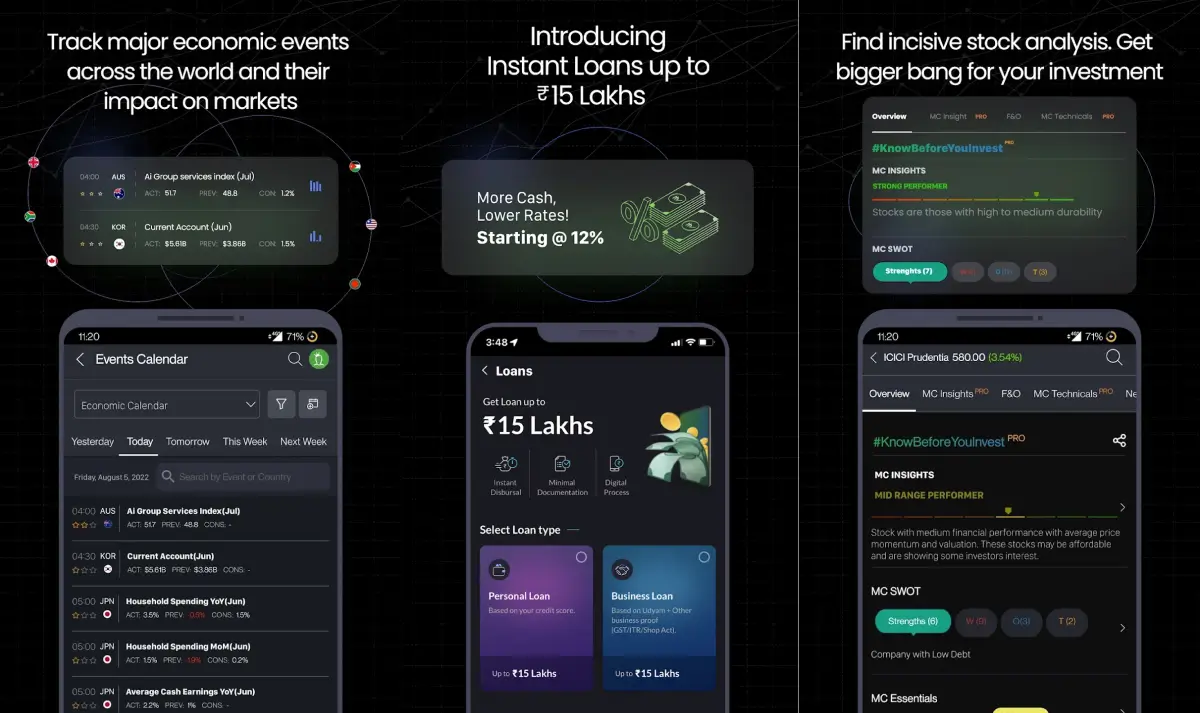
Top Strategies for Stock Market Beginners Using Moneycontrol
1. Starting with Blue-Chip Stocks
Best to start with are blue-chip stocks that are more stable and predictable. These established corporations are likely to provide consistent returns as well as reduced risk, which is a secure option among beginners. Moneycontrol assists in locating and monitoring these stocks that will serve as a strong basis towards your investment experience.
2. Diversifying Your Portfolio
To minimize risk, diversification is essential. The effect of under performing stocks is reduced by diversifying investments in various sectors and asset classes. Moneycontrol portfolio tracking makes the process of diversification simpler by providing tools to monitor and manage diversities to make sure that you effectively balance risk and reward.
3. Dollar-Cost Averaging
Dollar-cost averaging (DCA) is an investment where the individual invests a set sum at an equal rate, irrespective of the market environment. The aim of this approach is to minimize the chance of huge investment at the market high. Moneycontrol helps with DCA, creating alerts and monitoring regular investments, which provides uniformity and future increases.
4. Staying Updated with Market Trends
It is important to keep abreast to make the right decisions at the right time. Moneycontrol can supply you with real time news, stock prices, and advice to enable you to follow along the market trends and happenings that could impact on your investments. You can also set up price changes and news alerts that are personalized in the app.
5. Learning from Expert Opinions and Webinars
In addition to other market resources like magazines, Moneycontrol provides the beginner trader with expert analysis, articles and webinars to further facilitate their knowledge of the market. By having such resources, you will be able to better your investment strategies and decision-making skills so that you can keep up to date and make informed decisions.
Safety and Security Features of the Moneycontrol App
1. Data Privacy and Protection
Moneycontrol app is one of the best stock market app that values the privacy of users and therefore uses high levels of security to safeguard the personal and financial information. It applies encryption technologies that help in protecting your sensitive data by making sure that all activities and personal information is safe. Moreover, the app complies with privacy policies to avoid unwarranted access and keep your information confidential.
2. Two-Factor Authentication (2FA)
To provide an increased level of security, Moneycontrol provides Two-Factor Authentication (2FA). The use of 2FA is an additional security measure as it ensures the additional requirement of a one-time verification code that would be sent via mail or SMS to your phone or email in addition to the password you use. This goes a long way in lessening the chance of unauthorized access with your account and as such, you can rest well tracking and managing your investments.
3. App Permissions and Controls
Moneycontrol does publish information regarding the data that it collects and its use. The app only needs the permissions that are needed to operate it, like access to your device storage or network. The app will allow you to regulate access to some personal data and set privacy settings to your needs. This will keep your personal data processed in a responsible and data protection compliant manner.
Security measures such as these have made the Moneycontrol app a secure place to manage your investments with your financial information, being safe and confidential.

Pros and Cons of Using Moneycontrol App for Stock Market Beginners
Pros
- User-friendly Interface: Moneycontrol is well presented with a friendly interface which is easy to navigate thus perfect with beginners who might be new to stock market apps.
- Real-Time Data: The uae stock market app offers stock prices in real time, market developments and news, so you never miss the latest development and make investment decisions on time.
- Complete Functionality: Moneycontrol has an extensive number of functions, including portfolio management, stock analysis, and watchlists, which assists novices in managing and monitoring their investments.
- Learning Content: The app provides useful educational resources, such as opinion pieces, news, and webinars, enabling novices gain a solid base in stock market investing.
- Portfolio Tracking and Analysis Tools: portfolio tracker of Moneycontrol helps users to revive their investments, performance assessment and gauge the possible gains or losses with ease.
Cons
- Fewer Advanced Tables to Experienced Traders: The app is excellent in the eyes of a beginner trader, but some advanced capabilities and features are missing that may be required by experienced traders such as complex charting or algorithmic trading software.
- Infrequent Lags in Performance: There are periodic performance lag or slowness reported by some users especially during market high activity or when accessing some features, which is frustrating.
Even though there are some minor limitations, Moneycontrol is an extremely useful application that stock market novices can use to find important tools and resources in order to make investment decisions without any uncertainties.
Cost to Develop an App Like Moneycontrol
If you're considering building an app similar to Moneycontrol, here's a breakdown of the development costs based on feature sets, development stages, and types of mobile app development Dubai versions.
1. Basic Version
The basic version of a Moneycontrol-like app includes essential features such as portfolio tracking, watchlists, and market data.
Core Features
- Portfolio tracking
- Basic stock quotes and news
- Watchlist feature
- Simple user profiles
- Basic charting functionality
Estimated Cost: $50,000 – $120,000
2. Advanced Version
The advanced version adds more complex features such as real-time market feeds, advanced charts, and notifications. It provides a better user experience and more interaction options.
Core Features
- Real-time market data feeds
- Advanced charts and analytics
- Custom notifications and alerts
- Data synchronization across devices
- Enhanced UI/UX design for smoother navigation
Estimated Cost: $120,000 – $250,000
Enterprise Version
The enterprise version by a top mobile app development company includes premium features designed for more demanding users, such as AI-driven insights, multi-exchange support, and more robust admin dashboards.
Core Features
- AI-driven insights and market recommendations
- Multi-exchange data integration
- Admin dashboard for managing user data
- Scalability for large user bases
- Advanced security features and data encryption
Estimated Cost: $250,000 – $600,000+
| Version | Estimated Cost |
|---|---|
| Basic Version | $50,000 – $120,000 |
| Advanced Version | $120,000 – $250,000 |
| Enterprise Version | $250,000 – $600,000+ |
DXB APPS is A Leading Mobile App Development Company in Dubai
DXB APPS is a leading mobile app development company in Dubai renowned for delivering high-quality, scalable, and user-friendly mobile and web applications. Based in Dubai, the company specializes in creating innovative digital solutions that cater to a wide range of industries, including healthcare, retail, fintech, and education. With a team of experienced developers, designers, and project managers, DXB APPS ensures that every app is tailored to meet the specific needs and goals of its clients. They focus on delivering seamless user experiences, integrating the latest technologies, and employing best practices to drive success in the digital world.
At DXB APPS, we pride ourselves on our ability to turn ideas into successful products. As a trusted partner for businesses looking to enhance their digital presence, we offer end-to-end services, from initial consultation and design to development and post-launch support. Our expertise in developing apps that are not only functional but also engaging has helped many organizations optimize their operations, improve customer satisfaction, and boost revenue.

Conclusion
The Moneycontrol app is more than just a stock market tracker; it’s your ultimate companion on the path to becoming a confident investor. Designed specifically for beginners, it breaks down the complexities of the market into simple, actionable insights. With features like real-time market updates, portfolio tracking, and tailored notifications, Moneycontrol puts the power of investing right at your fingertips. Whether you're exploring the world of stocks for the first time or looking to refine your approach, this app equips you with everything you need to navigate the market with confidence.
As you embark on your investing journey, the Moneycontrol app stands as a trusted partner, guiding you every step of the way. It’s not just about tracking stocks; it's about understanding the market, making informed decisions, and building a strategy that grows with you.
FAQS
Is Moneycontrol App Free?
Yes, Moneycontrol offers a free version with essential features like portfolio tracking, stock quotes, and news. For advanced tools such as real-time data, in-depth analysis, and ad-free experience, a premium subscription is available.
How Do I Track My Stock Portfolio on Moneycontrol?
To track your portfolio, create an account, add stocks to your portfolio, and set up watchlists. You can monitor their performance in real-time, view historical data, and get alerts for price changes or important news.
Can I Use Moneycontrol for Intraday Trading?
Yes, Moneycontrol is suitable for intraday traders. It provides real-time market data, stock quotes, charts, and technical analysis, helping traders make quick, informed decisions for intraday trades. However, it doesn't offer direct trading features.
How Accurate Is the Data on Moneycontrol?
Moneycontrol offers real-time stock market data sourced from reliable exchanges, ensuring accuracy for most market activities. However, occasional delays may occur due to market fluctuations, so it’s advisable to cross-check with your broker for live trading.
Can I Customize Notifications on Moneycontrol?
Yes, Moneycontrol allows you to customize notifications for stock price alerts, portfolio performance updates, and breaking market news. You can set alerts based on price movements, percentage changes, or specific events for a personalized experience.