
Are you an Android user searching for the best way to download videos from your favorite platforms? This article is all about TubeMate, a powerful and flexible video tool for Android users seeking offline access to online content. TubeMate is designed specifically for those who want to save videos from multiple platforms—including YouTube, Vimeo, and Dailymotion—directly to their devices for offline viewing. Unlike many other video downloader apps, TubeMate is not available on the Google Play Store due to policies that restrict apps facilitating video downloads from certain platforms. Instead, it must be downloaded from trusted third-party sources.
TubeMate stands out for its unique features, user-friendly interface, and advanced download management, making it the go-to choice for Android users who want a reliable, versatile, and efficient video downloader. Whether you want to save videos for offline viewing, manage your downloads with ease, or choose from a variety of formats and resolutions, TubeMate offers everything you need in one app.
Summary: Why TubeMate Is Better Than Other Video Downloader Apps
TubeMate is the top choice for Android users who want a comprehensive video downloading solution. Here’s why TubeMate outshines other video downloader apps:
- Support for Multiple Platforms: TubeMate allows you to download videos from a wide range of popular platforms, including YouTube, Vimeo, Dailymotion, Facebook, Instagram, Twitter, and more. In addition to videos and music, TubeMate also supports downloading gaming content and games, making it a versatile tool for all your entertainment needs.
- Flexible Format and Resolution Options: Choose from various video resolutions (such as 1080p, 720p, and 480p) and formats (MP4, MP3, M4A, OGG) to suit your device’s storage and your viewing preferences.
- Advanced Download Manager: TubeMate features an advanced download manager that lets you pause, resume, and organize your downloads efficiently, giving you full control over your device’s bandwidth and storage.
- User-Friendly Interface: The app’s intuitive design makes it easy for anyone to search for, select, and download videos, regardless of technical skill level.
With these features, TubeMate delivers a seamless and powerful video downloading experience that is unmatched by other apps.

Introduction to TubeMate
TubeMate is a powerful and flexible video tool for Android users seeking offline access to online content. It is designed for anyone who wants to download videos directly to their Android device from multiple platforms, including YouTube, Vimeo, and Dailymotion. TubeMate is not available on the Google Play Store due to policies that restrict apps facilitating video downloads from certain platforms, so users must download it from reputable third-party sources. This article is for Android users who want a reliable, feature-rich video downloader app that stands out from the rest.
Smartphones have revolutionized how we watch movies and videos, and TubeMate makes it easy to save your favorite content for offline viewing. With so many options available, finding an app that truly performs well can be challenging. TubeMate addresses common issues like slow downloads, complicated interfaces, and intrusive ads, offering a smooth and enjoyable experience for all users.
More than 2.8 billion people download videos every month on their phones around the world.
What Makes This App Really Good?
TubeMate has features that other download apps just can't match. Downloads happen much faster than with most other apps, and you can save multiple videos at the same time. The interface is clean and simple, making it easy for both beginners and tech-savvy users to navigate.
Other apps often require payment for basic features or limit you to low-quality downloads. TubeMate, on the other hand, gives you everything for free. You can select from various video types and quality levels, ensuring you get the best fit for your device and available storage.
Transition: Now that you know what sets TubeMate apart, let’s look at how to get the app on your phone.
Getting the App on Your Phone
Putting TubeMate on your Android phone is straightforward. Since TubeMate is not available on the Google Play Store, you’ll need to download it from trusted websites. If this is your first time installing from Uptodown or another reputable source, you may need to grant installation permission in your device settings. During the APK setup process, you may need to tap 'Install' or similar prompts and approve any required permissions for the app to function properly. The setup process only takes a couple of minutes, and then you can start downloading videos right away.
Being safe is crucial when downloading any app file from the web. Always use official or trusted sources to avoid fake copies that could harm your device. If you encounter any issues during installation or setup, assistance is available to help guide you through granting the necessary permissions and completing the process. The genuine version of TubeMate provides all the features you need without compromising your phone’s safety or privacy.
Once you have the app installed, you can explore its enhanced features.

Enhanced Features with Modified Versions
Some users want extra features that go beyond what the standard version offers. TubeMate mod apk versions provide additional benefits, such as:
- No ads for an uninterrupted experience
- Access to premium features
- Faster download speeds
- Enhanced customization options
These special versions perform the same basic functions but add helpful extras for frequent users. However, always be cautious when downloading modified apps from unfamiliar sources. Verify the source and scan files before installation to ensure compatibility and safety. Some mods maintain the security of the original app while offering valuable enhancements.
Transition: With these enhanced features, TubeMate continues to deliver value to users. Next, let’s see how you can access all these features for free.
Free Access to Really Good Features
Getting great value without spending money is important to most people. TubeMate free download allows everyone to use professional video downloading features without paying or dealing with hidden charges. This approach makes high-quality video downloading accessible to users regardless of their budget or location.
TubeMate’s focus on user satisfaction over profit has earned it a loyal following. Users appreciate the honest, straightforward features without surprise costs.
Transition: Now, let’s dive into the wide range of video download features TubeMate offers.
All Kinds of Video Download Features
TubeMate supports video downloads from various platforms and allows users to manage their media efficiently. This app does much more than basic downloading—it’s a comprehensive tool for all your video needs.
After downloading videos with TubeMate, users can import these files into other apps to create short videos, add effects, or produce their own content for social media and sharing platforms.
Supported Platforms
- YouTube
- Vimeo
- Dailymotion
- And more
Audio and Video Formats
- MP4 (video)
- MP3 (audio)
- M4A (audio)
- OGG (audio)
TubeMate allows users to download audio-only tracks in formats like MP3, M4A, and OGG, making it easy to extract music or songs from videos. You can download audio tracks in MP3 format from many videos, perfect for building your music library or enjoying your favorite songs offline.
Built-in Media Player
The app also provides a built-in media player for immediate playback of downloaded media, including both video and audio files.
Whether you need MP4 for standard viewing, MP3 for just the audio, or other formats, TubeMate handles everything smoothly. This flexibility is ideal for different situations and all types of Android devices.
Transition: With such a wide range of features, TubeMate is suitable for almost any user. But what about iPhone users?
Key Features That Make TubeMate a Powerful Video Downloader
In-App Browser and Discovery
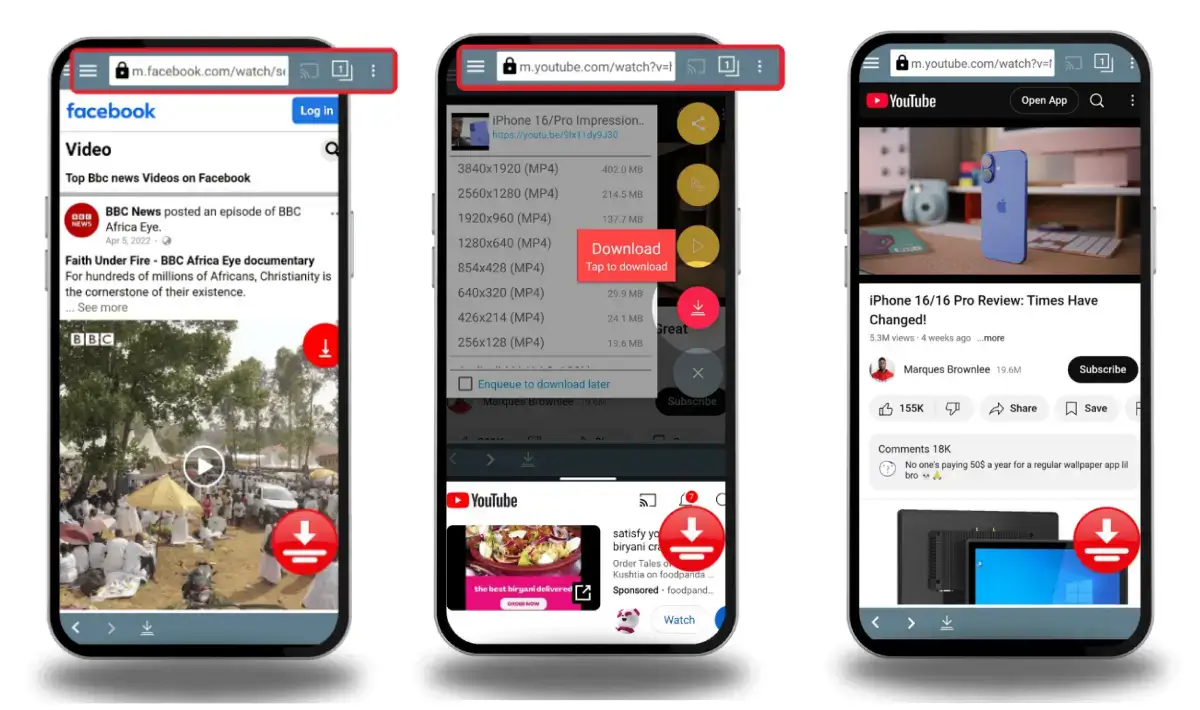
TubeMate’s in-app browser is a standout feature that makes discovering and downloading videos easier than ever. Instead of switching between different apps or browsers, users can search for and navigate to their favorite online videos directly within TubeMate. The browser is optimized for popular video platforms like YouTube, Vimeo, and Dailymotion, allowing you to find the content you want quickly and efficiently.
With the in-app browser, you can download videos directly to your device without leaving the app, streamlining the entire process. This not only saves time but also helps conserve mobile data, as you can download videos for offline viewing in just a few taps. Whether you’re searching for new music, trending clips, or educational content, TubeMate’s integrated browser makes it simple to discover, download, and enjoy videos from a wide range of platforms—all in one place.
Night Mode and Customization
TubeMate understands that every user has unique preferences, which is why it offers a night mode feature for comfortable video downloads and viewing in low-light environments. Night mode reduces eye strain and makes it easier to watch videos or manage downloads at night or in dark settings, enhancing your overall viewing experience.
Beyond night mode, TubeMate provides a variety of customization options. Android users can adjust download settings based on their internet speed, ensuring smooth and efficient video downloads regardless of their connection. The app’s interface can also be personalized, allowing users to tailor the look and feel to match their style and needs. These customization features make TubeMate an ideal app for anyone who wants to manage and enhance their video downloads, watch YouTube and other platform videos offline, and enjoy a user experience that fits their lifestyle.
Easy Interface and User Experience
TubeMate prioritizes user experience with smart design choices and intuitive navigation. The interface is simple and logical, with clearly labeled buttons and menus that make sense to users of all skill levels. It adapts perfectly to different screen sizes and orientations.
These design choices directly enhance the viewing experience, making video playback more comfortable and enjoyable. Users can easily access features and adjust settings to suit their preferences.
Visual design elements work seamlessly with functionality, avoiding unnecessary distractions or confusion. Clean design, a pleasant color scheme, and readable fonts all contribute to a positive and effective user experience. These choices show the development team’s commitment to creating software that’s truly easy to use.
Transition: Next, let’s compare TubeMate’s download speed to other apps.
Offline Playback
One of TubeMate’s most valuable features is its robust offline playback capability. After you download videos, you can watch them anytime—no internet connection required. This is perfect for Android users who want to save mobile data or enjoy their favorite content while traveling, commuting, or in areas with limited connectivity.
TubeMate lets you choose from multiple resolutions, including lower resolutions that help save storage space on your device. The app supports a wide range of video formats, ensuring compatibility with different devices and platforms. Whether you’re downloading music videos, educational clips, or entertainment content, TubeMate makes it easy to save and watch videos offline. This reliable video downloader is especially helpful for users with limited data plans, as it allows you to download videos in advance and watch them later, all while managing your storage space efficiently.
Download Speed and How It Compares to Others
Speed tests consistently show that TubeMate outperforms competing apps. Download speeds often surpass those of other popular video downloaders, especially when downloading multiple files simultaneously. This advantage saves users significant time when building their offline video collections. Users can seamlessly switch between TubeMate and other apps without interrupting downloads or playback, ensuring convenience and uninterrupted media enjoyment.
Performance improvements extend beyond download speeds to overall system efficiency. The app manages system resources intelligently, remaining responsive even during heavy downloading sessions. Memory management and processor usage are optimized to prevent slowdowns or conflicts with other installed apps.
Transition: Safety and privacy are also top priorities for TubeMate users.

Safety and Privacy Protection Features
User safety is a top priority in TubeMate’s design and ongoing development. Downloads are secured with encrypted connections, and the app does not collect unnecessary personal data. Privacy policies clearly explain what information is accessed and how it is used.
Regular safety updates address potential issues promptly, maintaining the highest protection standards. The development team actively monitors security trends and implements necessary improvements to keep users safe while downloading content.
Transition: Efficient file management is another area where TubeMate excels.
iPhone Users and What They Can Do
People with Apple devices often ask if they can use TubeMate. Unfortunately, TubeMate for iPhone isn’t available directly because Apple’s App Store policies prohibit video downloading apps that violate their guidelines. However, iOS users can explore web-based alternatives or other approved apps that offer similar functionality.
While you can’t get the exact same TubeMate app on iPhone, you can still download videos through different legal methods that comply with Apple’s rules.
People watch downloaded videos for about 45 minutes every day when they're offline.
Transition: For those who prefer older versions of TubeMate, there are options available as well.
Getting Older Versions of the App
Sometimes users prefer older versions of apps for compatibility or interface reasons. TubeMate free download of previous releases is available for those who need specific compatibility or prefer earlier designs. Older versions are especially helpful for users with less powerful phones or unique system requirements.
Version compatibility is crucial when dealing with older Android devices or special setups. TubeMate old version download options ensure that everyone can enjoy reliable video downloading, regardless of their device.
Transition: Now, let’s explore how TubeMate works with YouTube and other platforms.
YouTube Features and How It Works
TubeMate excels at downloading content from the world’s largest video website. With TubeMate, you can easily search for any video using the built-in search bar and download it directly while browsing your favorite content. TubeMate YouTube downloader features integrate seamlessly with YouTube’s interface, making the process smooth and user-friendly.
YouTube offers multiple video quality options, from standard definition to ultra-high-definition. TubeMate lets you choose the quality that best fits your device and storage, ensuring a fantastic viewing experience.
Transition: Ready to get started? Here’s how to install and set up TubeMate on your Android device.
How to Install and Set Everything Up?
Getting started with TubeMate is simple. Follow these steps to install and configure the app:
- Download the APK: Always download the TubeMate apk file from official or trusted websites to ensure safety.
- Enable Installation from Unknown Sources: Go to your device settings and allow installation from unknown sources if prompted.
- Install the App: Open the downloaded APK file and follow the on-screen instructions to install TubeMate. You may need to tap 'Install' or similar prompts during the installation process.
- Configure Settings: After installation, open the app and adjust settings to match your preferences, such as default download quality, notification settings, and storage location (internal storage or SD card).
- Start Downloading: Once set up, you can begin searching for and downloading videos right away.
These custom options ensure the app works exactly how you want it to.
Transition: With TubeMate installed and configured, let’s look at how it’s optimized for Android devices.
Android Phone Optimization and Performance
TubeMate is built specifically for Android phones and is optimized for various Android versions and device specifications. Whether you have a flagship phone or a budget device, TubeMate adjusts to provide the best possible experience.
Performance improvements include efficient memory usage, fast download speeds, and minimal battery consumption. These technical enhancements allow you to download multiple videos simultaneously without slowing down your phone or draining your battery.
Transition: Next, let’s examine the technical details that make TubeMate a standout choice.

Technical Details
Multiple Resolutions and Formats
TubeMate stands out as a highly efficient video downloader, designed to make downloading videos directly to your device both simple and effective. Android users can save their favorite content for offline viewing, helping manage mobile data usage and enjoy videos anytime, anywhere. The app offers multiple resolutions for every download, so users can select the video quality that best fits their storage space and viewing needs—whether they want crisp HD or smaller, lower resolutions to save space.
User-Friendly Navigation
Navigating TubeMate is straightforward thanks to its simple interface and clearly marked download button. This makes it easy for anyone to search, select, and download videos from a wide range of platforms, including YouTube, Facebook, and Twitter. The app supports various formats, allowing users to choose the best option for their device and how they want to play or share their videos.
Installation Requirements
Since TubeMate YouTube Downloader isn’t available on the Google Play Store, installation requires enabling unknown sources in your device settings. This quick step allows users to install the app safely and start downloading online videos right away. The installation process is user-friendly, with clear instructions and prompts for any necessary permissions, ensuring a smooth setup even for those new to video downloader apps.
Compatibility and Updates
TubeMate’s compatibility with different Android versions and devices makes it a widely used choice among Android users. Developers are committed to providing regular updates, enhancing performance, fixing issues, and adding new features to keep the app reliable and helpful. Whether you want to manage your storage space, control video quality, or simply enjoy your favorite content offline, TubeMate offers an ideal, free solution for anyone looking to enhance their video downloading experience on Android.
Transition: With these technical strengths, TubeMate is truly the best video download solution for Android users.
Tubemate - The Best Video Download Solution
TubeMate represents the very best of video downloading technology available today. It combines powerful features with an easy-to-use design for an unmatched downloading experience. TubeMate includes an advanced download manager that allows users to pause, resume, and organize their downloads efficiently. You can pause, resume, or cancel downloads as needed, giving you full control over your device's bandwidth. The platform’s commitment to providing free, reliable service has made it the top choice for millions of people worldwide.
The app’s success lies in its focus on delivering real value to users, rather than maximizing profit. Continuous improvements and updates address actual user needs, resulting in a user-first approach that keeps TubeMate ahead of the competition.
In 2023, watching videos on phones increased by 78 percent over the previous year.
Transition: If you prefer direct installation, TubeMate offers an alternative method.
Installation File and Direct Downloads
Users can also install TubeMate on Android devices using the TubeMate apk file, which is ideal for those who prefer direct installation or lack access to app stores. This method ensures you get all the necessary components for proper installation.
Always verify the file and source before installing to ensure you’re getting the genuine app.
Transition: Choosing the right video downloader app is crucial—here’s why TubeMate is the smart choice.
Choosing the Right Video Downloader App
When selecting a video downloader app, consider speed, reliability, and features. TubeMate stands out by integrating all these aspects into a single, dependable package.
The market is crowded with alternatives, but few can match TubeMate’s performance and user satisfaction. Its free access, robust features, and frequent updates make it the intelligent choice for anyone serious about downloading videos.
Transition: Let’s see how TubeMate’s interface and user experience further enhance its appeal.
Video Downloader Comparison
TubeMate sets itself apart from other video downloader apps by offering a truly versatile and user-friendly experience for Android users. Unlike many alternatives, TubeMate allows you to download videos directly from a wide range of platforms, including YouTube, Vimeo, and Dailymotion. This means you can save your favorite content for offline viewing, which is especially helpful if you’re in an area with slow or unreliable internet.
One of TubeMate’s biggest advantages is its simple interface, making it easy for anyone to search, select, and download videos in just a few taps. The app supports multiple resolutions and formats, so you can choose the video quality that best fits your device and storage space. Whether you want to save space with lower resolutions or enjoy crisp HD playback, TubeMate gives you full control.
TubeMate is also designed to help users manage their storage space efficiently. You can download videos in different sizes, making it ideal for devices with limited space. Plus, by downloading videos for offline viewing, you can reduce your mobile data usage and avoid buffering or interruptions when you’re on the go.
With its broad compatibility across Android devices and support for various platforms, TubeMate is the ideal solution for anyone who wants to download, save, and manage videos easily. Its offline viewing capability and efficient use of space and data make it a standout choice among video downloader apps.
Benefits of Using TubeMate
Using TubeMate as your go-to video downloader comes with a host of benefits designed to enhance your viewing experience and make managing your media simple. With TubeMate, you can download videos directly to your device, allowing you to watch your favorite content offline whenever you want—no need for a constant internet connection.
The app offers a range of video quality options, so you can select the resolution that works best for your device and storage space. This flexibility ensures smooth playback and helps you save space on your phone. TubeMate’s compatibility with popular platforms like YouTube, Twitter, and Facebook means you can easily download online videos from a variety of sources, all within one app.
TubeMate’s simple interface and easy-to-use download button make it accessible for users of all skill levels. Whether you’re new to video downloading or a seasoned pro, you’ll find it straightforward to search for, select, and save videos. The app also helps you manage your storage space and reduce mobile data usage by letting you download videos for offline viewing, making it a reliable and helpful tool for Android users.
With TubeMate, you can enhance your viewing experience, save your favorite videos, and manage your data and storage with ease. Its wide range of features and user-friendly design make it the ideal choice for anyone looking for a simple, effective, and reliable video downloader on Android.
Alternatives to Online Platforms
TubeMate serves as a powerful alternative to traditional online video platforms, giving Android users the freedom to download and save videos for offline viewing. The app supports downloads from a variety of platforms, including YouTube, Facebook, Instagram, and Twitter, making it a versatile tool for anyone who loves online videos.
By using TubeMate, you can avoid ads and interruptions that often come with streaming, creating a smoother and more enjoyable viewing experience. It’s an excellent choice for users who want to save their favorite content—like music videos, tutorials, or entertainment clips—for later use. TubeMate’s simple interface and reliable performance make it easy to manage and organize your downloaded videos, ensuring you always have access to your favorite media, even without an internet connection. As a widely trusted and ideal video downloader, TubeMate empowers users to watch, save, and manage their content on their own terms.
If you want to explore more video downloading options, the VidMate App is another well-known alternative that allows Android users to download videos from multiple platforms and enjoy offline viewing with ease.

DXB APPS: Making the Best Mobile Apps in UAE
When UAE businesses need outstanding mobile apps, DXB APPS delivers solutions that work perfectly for their customers. As a leading mobile app development company, DXB APPS creates innovative apps for all types of businesses and industries across the region.
Their expertise in multimedia applications makes them ideal partners for video and entertainment app projects of any size. The experienced team understands the technical challenges of building robust downloading apps that work reliably every time. Whether you need comprehensive services for startups or large enterprise solutions, DXB APPS combines technical skill with deep local market knowledge.
Their complete development services cover everything from initial concept to post-launch support and ongoing updates. The team maintains the highest standards of quality, performance, and user experience in every project. Experienced mobile app developers quickly understand customer needs to deliver customized solutions that exceed expectations.
Transition: Let’s wrap up with some final thoughts on why TubeMate is the best choice for video downloading.
Final Thoughts
TubeMate is the gold standard for mobile video downloading, offering stability, fast download speeds, and unmatched user convenience. Its combination of powerful features, intuitive design, and completely free access makes it the obvious choice for anyone seeking the best video downloading solution available today.
The future of offline video watching depends on apps that prioritize user needs while maintaining high performance standards. By choosing proven solutions like TubeMate and staying informed about the latest features and updates, users can maximize their video downloading experience and build impressive offline collections.
FAQs
Is it safe to download and use this video downloading app?
Yes, when you get it from official places and websites you can trust, the app is completely safe to use. Always check where it comes from before downloading and stay away from suspicious websites that might have fake or infected versions.
Can I download videos in different quality formats using this app?
Absolutely! The app supports lots of video qualities from standard definition all the way up to high definition formats. You can choose the quality that works best for your phone's storage space and how you like to watch videos.
Does the app work with all video websites or just YouTube?
While it works really well with YouTube, the app also supports many other popular video websites too. The wide website compatibility makes it a versatile solution for downloading content from lots of different sources.